A playground for motion graphics and animation When you first open After Effects, don’t expect a basic video editing tool. Instead, you’ll find a sandbox for motion graphics, animated titles, and visual effects. From animating text and graphics to compositing multiple layers of footage, After Effects makes it easy to create polished, professional animations and video content. Its intuitive timeline and keyframe system makes even complex animations approachable. Position, scale, rotation, and opacity can be animated in minutes, letting beginners and pros alike bring ideas to life quickly. Layered compositions for endless possibilities At the heart of After Effects are compositions, which act like flexible scenes where images, video, text, and graphics come together. Each layer can be independently animated, stylized, or manipulated. Using masks, transparency mattes, or built-in effects, you can achieve visuals that go far beyond simple motion. For more depth, media can be arranged in 3D space,… read more

templates

After Effects templates are pre-designed, customizable project files (.aep) that allow users to create professional motion graphics by simply replacing placeholders with their own text or footage. Whether you are a YouTuber, a corporate video editor, or a freelance filmmaker, After Effects templates are the secret weapon used by pros to deliver high-quality results on a tight deadline. In this guide, we’ll break down exactly what these files are, the different formats you’ll encounter (like .aep, .aet, and .mogrt), and how to choose the right one for your 2026 workflow. If you’re curious about why After Effects is such a popular choice for motion graphics and video creators, check out our “Why Adobe After Effects?” guide. It dives into the software’s intuitive animation tools, 3D capabilities, and powerful effects—everything that makes creating with templates so much more versatile and fun. The Three File Formats You’ll Encounter In 2026, the term… read more
A beginner’s guide to making YouTube intros without spending any money! Making your YouTube channel look fantastic starts with the branding. Let’s look at YouTube intro templates. You’ve just got a groovy new YouTube channel up and running, or could do with some new awesome branding on an existing channel – how about a cool, animated logo intro to top and tail your videos? A professional looking video intro does wonders for your channel’s credibility. Often because people often make snap judgements on your content within the first few seconds of a video. A poorly made intro sequence can cause viewers to assume the rest of the video will be second-rate, even if your video production is first-class. So, how do you create professional looking YouTube intros with little, to no experience with animation software? And, also, how can you do this for free? Contents: Creating intro sequences using Adobe… read more
Grab these awesome free video templates for After Effects We’ve picked out a variety of amazing free projects including simple logo reveals, beautiful photo slideshows, corporate promotions and kinetic text – all in glorious high definition. So, if you’re in a pinch and need a bespoke video sequence, pronto! – save our list of 10 totally free After Effects templates. For personal and commercial use these projects work like magic, without needing any extra plugins, and will even open in older versions of After Effects (CS5 or later). Got After Effects? You can download a free trial version of Adobe After Effects from the link below. 1. High Voltage Logo Reveals We kick off our list of free After Effects templates with not one, but a pack of three high-tech logo reveals. Easy to use and of professional quality this template pack is sure to give your brand some… read more
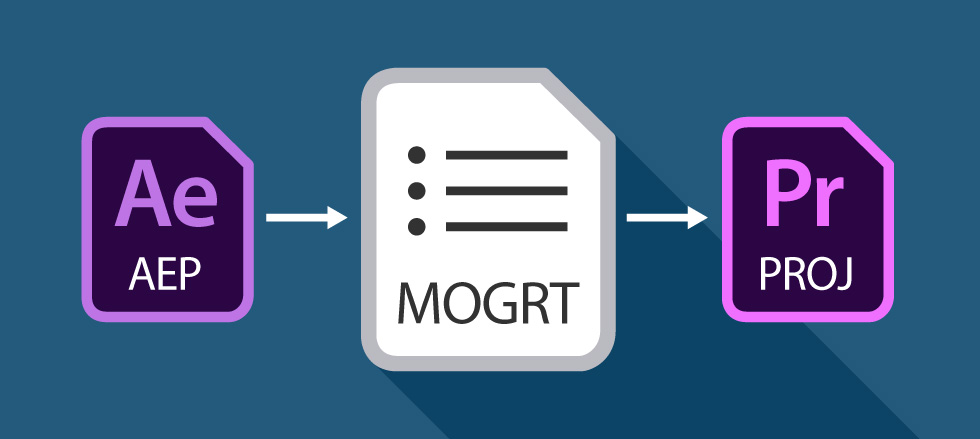
Editable animations inside Premiere Pro – get excited about Motion Graphics Templates! Have you heard of Motion Graphics Templates (MOGRTS)? Well, if you’re a video editor then things have just got very exciting inside Premiere Pro! Finally you can edit animations, created in Adobe After Effects, directly inside Premiere Pro – and you don’t even need to have After Effects installed on your machine! Perhaps you’re a devoted Premiere user and After Effects seems a little daunting, even with the profusion of easy-to-edit templates out there. Or, you’re simply fed up of switching between the two applications when creating your graphics-laden video productions. This is where Motion Graphics Templates (.mogrt) come into play. Updated for 2025:The workflow for MOGRTs has evolved. For a full, up-to-date guide on installing and editing templates in the latest version of Premiere Pro, visit our Ultimate MOGRT Guide. What are the benefits of Motion Graphics… read more
A short tutorial on how to quickly and easily make stunning video intros using After Effects templates – it’s a doddle! After Effects templates take the hard work out of motion graphics allowing you to quickly render out beautiful logo animations, and professionally brand your video content. Perfect for branding your new YouTube channel! Try After Effects for Free Use the link below to access a trial version of Adobe’s incredible motion graphics software. Share with someone!
Image Source : Simple Lower Thirds Pack Here’s a great tutorial for speedy lower third elements Simple lower third After Effects templates are all the rage right now and you can see packs of these elements becoming popular on template sites such as Enchanted Media. But how easy is it to create this sort of thing from scratch? Matt Jylkka shows how you can use After Effects to create some simple animated lower thirds in minutes. Tutorial : 5 Minute Lower Thirds in After Effects Video Source : Mt. Mograph Don’t even have five minutes? If you’re still stuck for time why not just download our Simple Lower Thirds Pack right away! Try After Effects for Free Use the link below to access a trial version of Adobe’s incredible motion graphics software. Share with someone!
More Posts
- PowerPoint Transitions: Every Effect Explained
- Canva Templates: The Ultimate Guide to Designing Faster and Smarter
- The 5 Best CapCut Alternatives in 2026
- Why Choose Adobe After Effects?
- The Ultimate Guide to Faceless YouTube Channels in 2026
Adobe Stock Search
Please use the search form below to find footage and video templates directly from Adobe Stock.
Great Value Packs

Sponsored Resources