Creating cool animations in After Effects is often really quite straightforward, but to make things even easier you’ll want to be using these handy tips and expressions. We’ve spent years creating motion graphics and animated sequences, so we thought we’d share our go-to, time-saving pointers – the shortcuts we use all the time! Included in this list : → Handy Tips for After Effects – general hints, tips and pointers for making life easier! → Useful After Effects Expressions – exciting code snippets to automate and elevate your animations! → Essential AE Keyboard Shortcuts – memorize these simple keystrokes to speed up your workflow! Try After Effects for Free Use the link below to access a trial version of Adobe’s incredible motion graphics software. Handy Tips for After Effects Let’s start with some general After Effects hints and tips, from project organization to quick effects. These pointers should become natural… read more

Tips and Tutorials
A collection of all tutorials across video editing, motion graphics, and creative software.
A beginner’s guide to making YouTube intros without spending any money! Making your YouTube channel look fantastic starts with the branding. Let’s look at YouTube intro templates. You’ve just got a groovy new YouTube channel up and running, or could do with some new awesome branding on an existing channel – how about a cool, animated logo intro to top and tail your videos? A professional looking video intro does wonders for your channel’s credibility. Often because people often make snap judgements on your content within the first few seconds of a video. A poorly made intro sequence can cause viewers to assume the rest of the video will be second-rate, even if your video production is first-class. So, how do you create professional looking YouTube intros with little, to no experience with animation software? And, also, how can you do this for free? Contents: Creating intro sequences using Adobe… read more
Let’s Create some animated text in Adobe After Effects! After Effects is universally accepted as the best software for motion graphics, and absolutely excels at animating text, though for the After Effects beginner its interface and multiple panels and settings can seem a little daunting. Fear not, help is at hand! With these handy, step-by-step After Effect tutorials you’ll learn how to add unique animation to your text in a matter of minutes! These short video tutorials are especially for beginners and utilize only the built-in After effects tools – explaining each process in detail. They cover glitch effects, wiggling text and hand drawn text techniques. Recorded in AE CC2018 these methods will work in all previous (or later) versions of After Effects. Try After Effects for Free Use the link below to access a trial version of Adobe’s incredible motion graphics software. How to Create Glitchy Text in After… read more

Close-up or medium shot? High angle or POV shot? What type of camera angle is best? We break down the basic camera shot types so you can storyboard your video or animation sequence with confidence! [br][br] For video makers, film directors and animators using the correct, conventional camera terminology is key to giving the impression that you know what you’re doing! One of the basics is learning how to describe the framing of your subject matter to other people. [br][br] This is where you’ll want to brush up on the language (or grammar) of camera shots. [br][br] Of course, you can simply disregard all of the tried and tested findings from a hundred years of cinema, and develop your own unique style of communicating! But, it’s important to know the rules before you break them. Bear in mind everyone in the television and film industry will be using the same… read more
Everything you need to know about Motion Graphics templates for Premiere Pro Ever wanted to add awesome animated graphics into your Premiere Pro video sequence, fast and easy? Well now you can, with Motion Graphics templates. Watch our short video introduction (below) to the exciting new world of Motion Graphics templates for Premiere Pro and scroll down for our comprehensive FAQ guide to get yourself up to speed. Looking for the 2025 Guide?For the latest step-by-step instructions on how to install and edit MOGRTs using the new Properties panel, read our Ultimate MOGRT Video Guide here. WHAT ARE MOTION GRAPHICS TEMPLATES? You may have been hearing a lot about Motion Graphics templates for Premiere Pro, but what exactly is a Motion Graphics template? Motion Graphics templates (.mogrt) are files that include text animations and video effects which you can edit and then add to your video sequences. They can be… read more
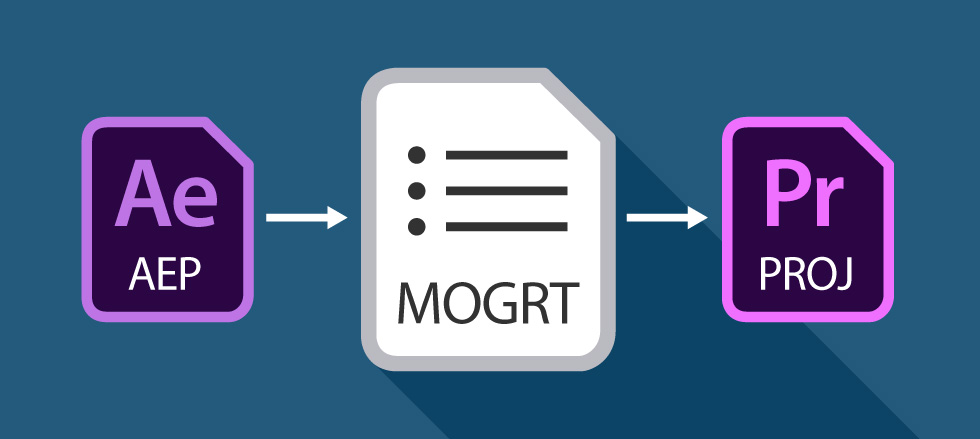
Editable animations inside Premiere Pro – get excited about Motion Graphics Templates! Have you heard of Motion Graphics Templates (MOGRTS)? Well, if you’re a video editor then things have just got very exciting inside Premiere Pro! Finally you can edit animations, created in Adobe After Effects, directly inside Premiere Pro – and you don’t even need to have After Effects installed on your machine! Perhaps you’re a devoted Premiere user and After Effects seems a little daunting, even with the profusion of easy-to-edit templates out there. Or, you’re simply fed up of switching between the two applications when creating your graphics-laden video productions. This is where Motion Graphics Templates (.mogrt) come into play. Updated for 2025:The workflow for MOGRTs has evolved. For a full, up-to-date guide on installing and editing templates in the latest version of Premiere Pro, visit our Ultimate MOGRT Guide. What are the benefits of Motion Graphics… read more
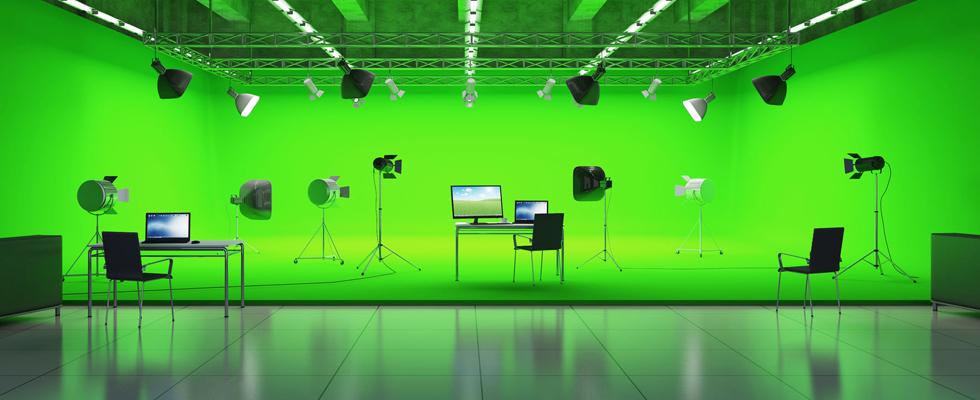
Removing the Green How to use green screen footage in your video production We’ve collected together a bunch of handy video tutorials which teach us how to successfully key out green screen footage clips from within Premiere, After Effects, Final Cut Pro, iMovie and Sony Vegas. Why not grab one of the green screen clips from Enchanted Media and try some chroma keying yourself using the tutorials below. So, what is green screen? Green screen technology, or chroma keying, is a video matting technique which has been around for decades. From tv weather reporting to effects-laden Hollywood blockbusters the use of green (or blue) surroundings enables film makers and video editors to quickly and easily substitute the background of a moving subject. This effect has understandably been included with almost all current video editing software packages and, with just a couple of clicks, all solid green areas becomes transparent (keying),… read more
A short tutorial on how to quickly and easily make stunning video intros using After Effects templates – it’s a doddle! After Effects templates take the hard work out of motion graphics allowing you to quickly render out beautiful logo animations, and professionally brand your video content. Perfect for branding your new YouTube channel! Try After Effects for Free Use the link below to access a trial version of Adobe’s incredible motion graphics software. Share with someone!
Image Source : Simple Lower Thirds Pack Here’s a great tutorial for speedy lower third elements Simple lower third After Effects templates are all the rage right now and you can see packs of these elements becoming popular on template sites such as Enchanted Media. But how easy is it to create this sort of thing from scratch? Matt Jylkka shows how you can use After Effects to create some simple animated lower thirds in minutes. Tutorial : 5 Minute Lower Thirds in After Effects Video Source : Mt. Mograph Don’t even have five minutes? If you’re still stuck for time why not just download our Simple Lower Thirds Pack right away! Try After Effects for Free Use the link below to access a trial version of Adobe’s incredible motion graphics software. Share with someone!
More Posts
- PowerPoint Transitions: Every Effect Explained
- Canva Templates: The Ultimate Guide to Designing Faster and Smarter
- The 5 Best CapCut Alternatives in 2026
- Why Choose Adobe After Effects?
- The Ultimate Guide to Faceless YouTube Channels in 2026
Adobe Stock Search
Please use the search form below to find footage and video templates directly from Adobe Stock.
Great Value Packs

Sponsored Resources