Social Media Quiz & Trivia MOGRT Pack for Premiere Pro
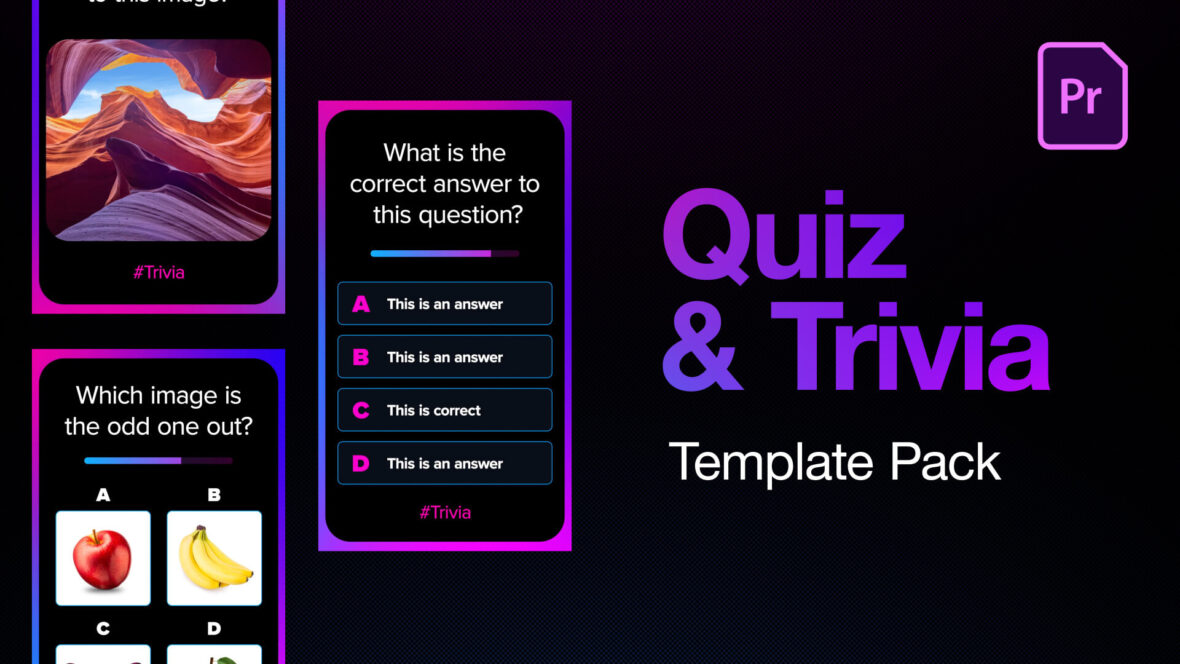
Perfect Video Templates for Faceless Quiz and Educational Channels
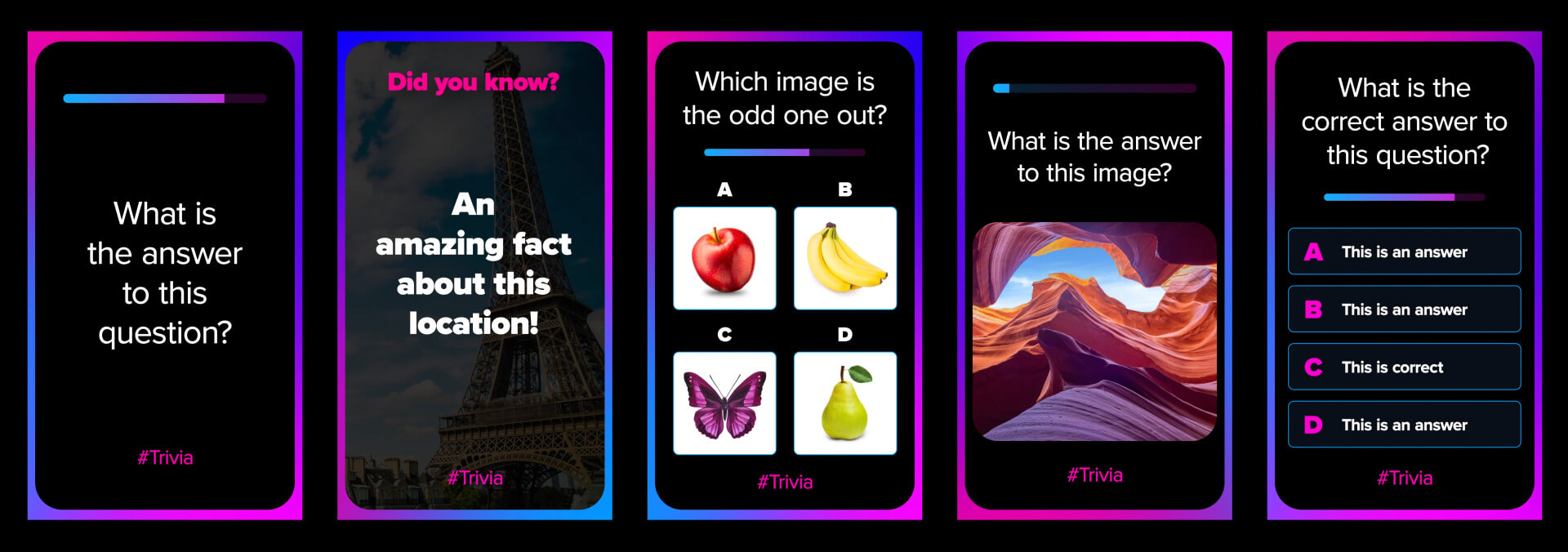
Create engaging quiz and trivia content faster with this pack of 5 vertical MOGRT templates for Adobe Premiere Pro. Designed for YouTube Shorts, TikTok, Instagram Reels and other social media platforms, these templates make it easy to produce professional-looking content for new or existing faceless quiz and trivia channels.
Instead of building every animation from scratch, you get a collection of ready-made animated graphics that can be customised directly inside Premiere Pro.
What’s included
- 5 animated quiz and trivia MOGRT templates
- Vertical 1080×1920 format for social media
- Multiple-choice quiz layouts
- Question and answer layouts
- Trivia and fact-style graphics
- Timer-based quiz animations
- Image and video media replacements
- Designed for faceless YouTube, TikTok and Shorts channels
Easy to edit in Premiere Pro
All templates are provided as MOGRT (Motion Graphics Template) files, allowing you to customise them directly inside Adobe Premiere Pro.
You can easily change:
- Text and questions
- Answers and trivia facts
- Fonts
- Colours
- Positioning and sizes
- Images and video
- Animation timing using Responsive Time
There is no need to open After Effects or rebuild complicated animations. Simply import the MOGRT files into Premiere Pro, add them to your timeline, customise the content and create your video.
Create more content, faster
Quiz and trivia channels need a steady stream of fresh content. This pack provides a collection of reusable animated layouts that can help you produce multiple posts quickly while maintaining a consistent visual style across your channel.
Use the templates to create:
- Trivia questions
- Multiple-choice quizzes
- Timed challenges
- Image-based quizzes
- Quick facts
- Guess-the-answer videos
- Interactive Shorts and social media posts
Perfect for
- Faceless YouTube channels
- YouTube Shorts creators
- TikTok creators
- Instagram Reels creators
- Quiz and trivia channels
- Educational content creators
- Social media content production
Build your content library faster
Whether you’re launching a brand-new quiz channel or increasing the output of an existing one, these Premiere Pro MOGRT templates provide a fast and flexible foundation for creating social media content.
Create one video, then reuse the templates again and again with new questions, answers, images, videos, colours and layouts.
Spend less time building graphics and more time creating content.
Adobe Premiere Pro MOGRT templates for fast, flexible quiz and trivia content creation.
Software Requirements
These are Motion Graphics Templates (MOGRT) for use in Adobe Premiere Pro CC.
For more information about Motion Graphics Templates, watch our Video Guide and read our comprehensive walkthrough on how to install and edit templates in the current version of Premiere Pro.
Try Premiere Pro for free!Buy This Pack – $15
Purchase this template pack directly via Gumroad.
More Templates for Premiere Pro
If we don't have the exact project you're looking for try Adobe Stock, which holds a huge library of template style and themes.Royalty Free Music
Uppbeat have a superb library of copyright-free music and sound effects, fully cleared for simple licensing. Plus, you can get 20% off their Creator and Pro plans using the button below!Find Copyright-Free Music
Need Stock Footage?
Adobe Stock is also our recommended library for high quality stock footage, animated backgrounds and video overlays. Use the following link and you can get your first month absolutely free!Try Adobe Stock for free!
Installing Motion Graphics Templates (Premiere Pro 2025)
To install a MOGRT file into Premiere Pro, please use the following updated instructions:1. Extract the Zip file to reveal the .mogrt file.
2. Open Premiere Pro and go to Window > Graphics Templates. Click the Install Motion Graphics Template icon (square with a plus sign) at the top right of the panel. (Note: In older versions, this was the Essential Graphics panel).
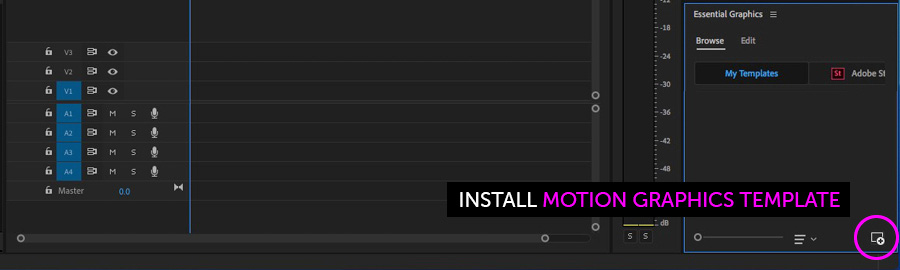
3. Locate the .mogrt file and choose Open.
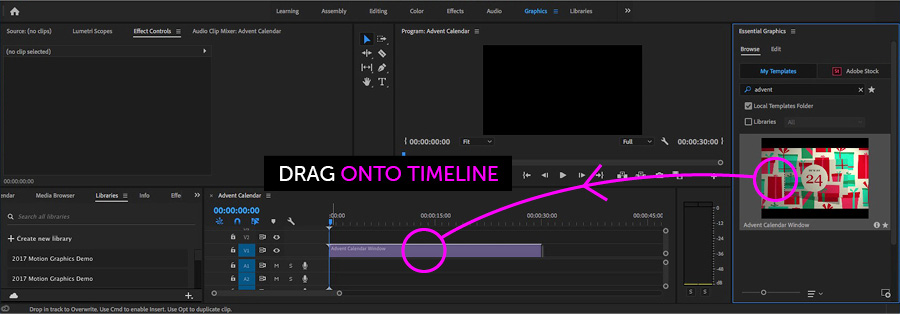
Once installed, drag the template from the Graphics Templates panel to your timeline to create an instance.
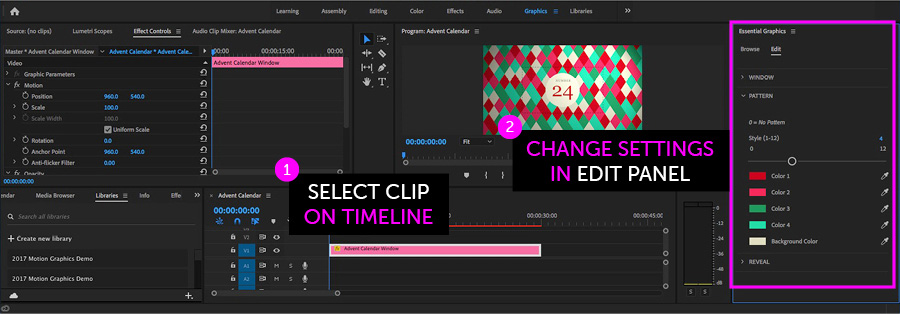
When a MOGRT is selected on your Timeline, use the new Properties panel (previously the Edit tab) to adjust settings.
Looking for a video walkthrough? Check out our Full Guide to using MOGRTs in Premiere Pro 2025.
Adobe Stock Search
Please use the search form below to find footage and video templates directly from Adobe Stock.
Great Value Packs

Popular Products
Sponsored Resources